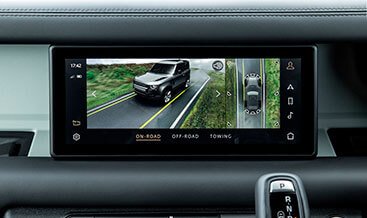
360 Camera Hardware Check Guide
Activating a 360 surround camera on a JLR vehicle is not always just a software change. Some vehicles need extra cameras, wiring, or module upgrades. This guide walks you through exactly how to check whether your vehicle has the hardware needed.
Step-by-Step Hardware Check
Step 1: Check VIN
Decode your VIN to see what options the vehicle was built with. Look for option codes related to surround cameras, parking assist, or vision assist packages. You can use TOPIx or contact us JLR Engineering with your VIN for a free build sheet check.
Step 2: Check Existing Cameras
Inspect the front bumper, side mirrors, and rear hatch for camera modules. Many vehicles have cameras fitted but not connected or enabled. If you already see cameras in the mirror housings and front grille, your vehicle is likely 90% ready for activation.
Step 3: Check Module Part Numbers
Identify the Image Processing Module (IPM) or Surround Camera Module (SCM) part number. Compare against known compatible part numbers for 360 camera support. Using a diagnostic tool like JLR Engineering or JET-PRO makes this step straightforward.
Step 4: Verify Wiring Harness
Check whether the wiring harness for the surround camera system is present in the vehicle. Missing harnesses will require a jlr hardware retrofits kit. The harness typically runs from the front bumper, through the A-pillars, to the side mirrors and rear camera.
Step 5: Confirm ICM Software Version
Verify the Infotainment Control Module (ICM) software version. Older versions may need updating before 360 camera our retrofit solutions activation can be performed. The ICM must support the surround camera overlay graphics and split-screen view.
Vehicle-Specific Hardware Requirements
| Vehicle | Model Year | Cameras Needed | Module Required | Wiring Harness | Software Update |
|---|---|---|---|---|---|
| Range Rover (L405) | 2017+ | 4 (front, 2 side, rear) | IPM with surround support | OEM or retrofit | Usually required |
| Range Rover Sport (L494) | 2019+ | 4 | IPM with surround support | OEM or retrofit | Usually required |
| Defender (L663) | 2020+ | 4 | IPM or Pivi Pro module | OEM or retrofit | Usually required |
| Discovery (L462) | 2017+ | 4 | IPM with surround support | OEM or retrofit | Usually required |
| Velar / Evoque (L560/L551) | 2018+ | 4 | IPM with surround support | OEM or retrofit | Usually required |
| Jaguar F-PACE | 2016+ | 4 | IPM with surround support | OEM or retrofit | Usually required |
| Jaguar XE / XF | 2019+ | 4 | IPM with surround support | OEM or retrofit | Usually required |
Common Questions
Can I add 360 cameras if my vehicle has no cameras at all?
Yes, but it requires a full hardware jlr hardware retrofits: 4 cameras, wiring harness, and a compatible IPM module. This is a larger job and usually takes 4–6 hours. JLR Engineering offers retrofit kits for most models.
What if I only have a rear camera?
You will need to add the front, left, and right cameras. In many cases, the wiring harness is partially present, reducing labour time. We can check this with a VIN decode.
Related Guides
Not Sure If Your Vehicle Has the Hardware?
Send us your VIN and we will tell you exactly what your vehicle was built with — free, same-day response.
Check My VIN